Two recent blog posts sparked a debate in the developer community. DBOS argued that Postgres is all you need for durable execution: ditch external orchestrators like Temporal and Airflow, use your database directly. Obelisk countered that SQLite is all you need for durable workflows: for many AI agent workloads, a local file-based database beats a network server. Both posts are right, for different deployment shapes. This article explains both patterns with working code and gives you a concrete decision framework.
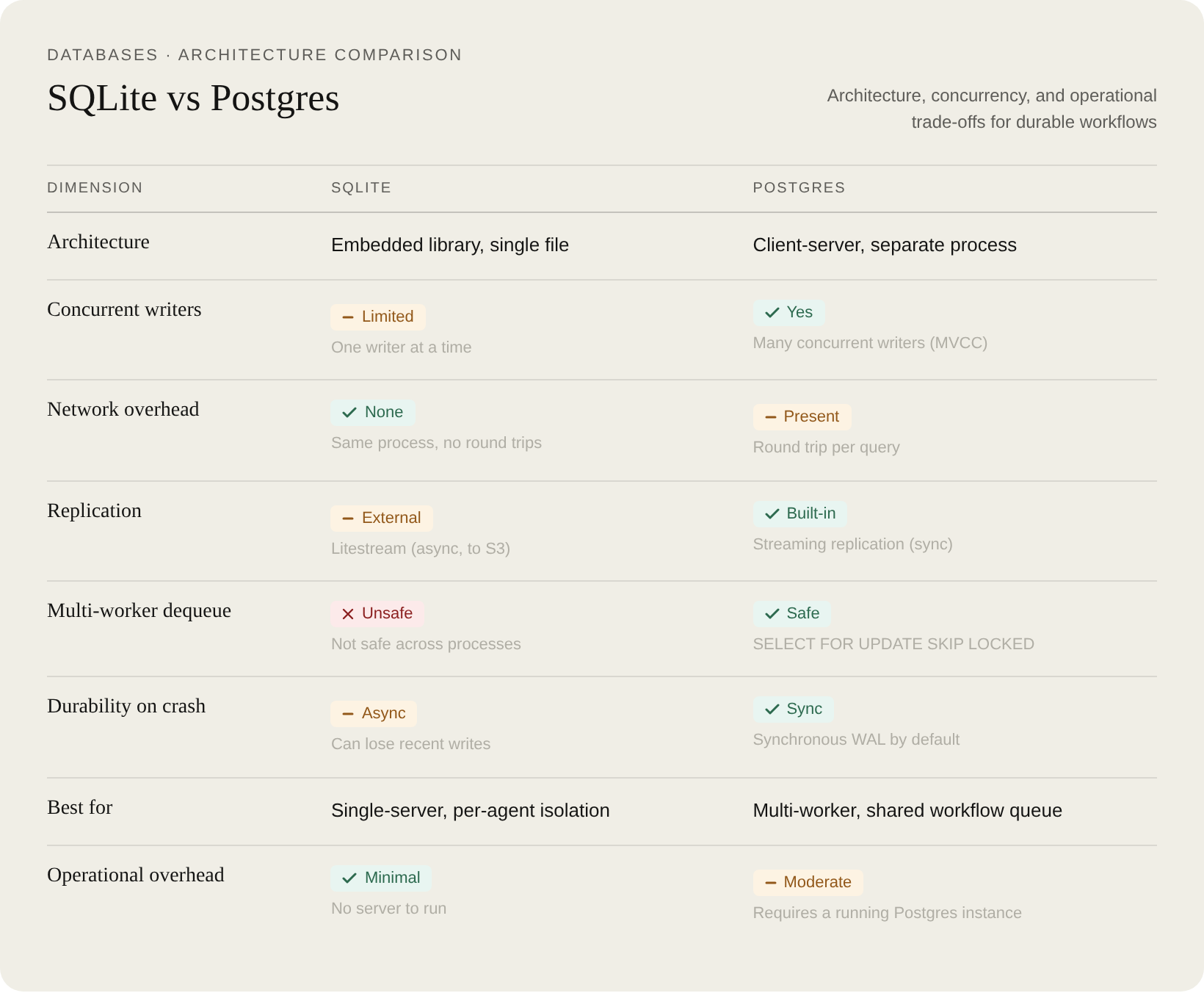
Quick comparison
What durable execution means in practice
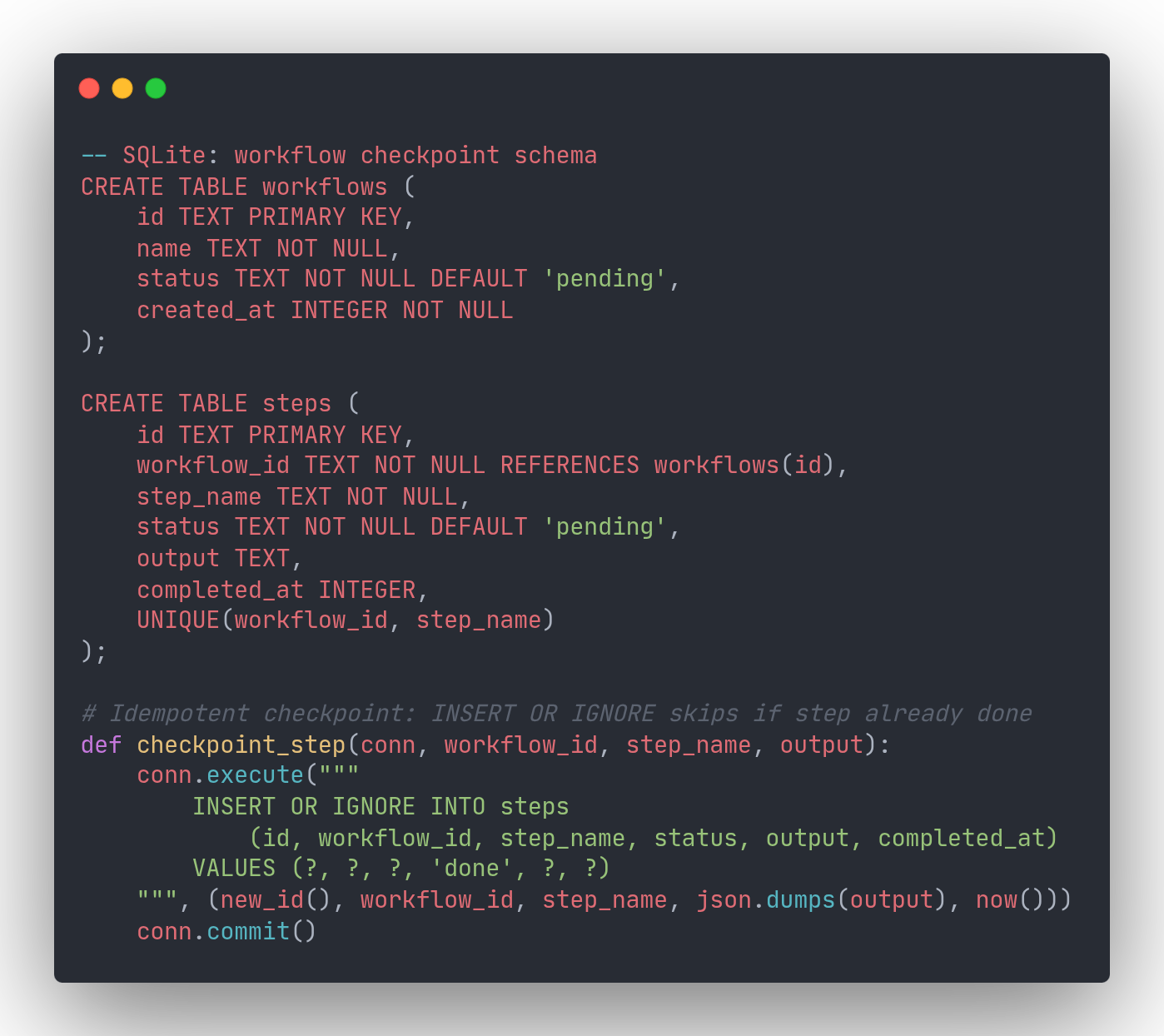
The idea is straightforward: as your program runs, checkpoint its progress to a database. If the process crashes, reload from the last checkpoint and resume from the last completed step (like reloading a save in a video game). The minimal data structure is a workflows table (one row per run) and a steps table (one row per completed step).
Idempotency is the critical invariant: step checkpoints must be safe to retry. If your worker crashes mid-step and re-executes, it should not charge a payment twice or make a duplicate API call. The checkpoint query must be a no-op when the step has already completed.
This matters especially for AI agent workflows, where LLM calls are slow and expensive. If an agent crashes mid-pipeline, you want to skip the steps that already succeeded and resume from where things stopped, not re-run every LLM call from the beginning.
How SQLite-backed workflow checkpointing works
SQLite is an embedded library with no server process. Your application links it directly and reads and writes a single file on disk. As the official SQLite documentation puts it: "SQLite does not compete with client/server databases. SQLite competes with fopen()."
For workflow checkpointing, the key technique is INSERT OR IGNORE on a UNIQUE(workflow_id, step_name) constraint. When a worker retries after a crash, any step that was already checkpointed is silently skipped. Resuming is equally simple: query completed steps, then continue from wherever the list runs out.
SQLite works especially well when each agent or tenant has its own database file. The official SQLite docs describe this as the "server-side database sharding" pattern: "the server might have a separate SQLite database for each user, so that the server can handle hundreds or thousands of simultaneous connections, but each SQLite database is only used by one connection." For AI agent fleets, this gives you natural fault isolation: one misbehaving agent cannot lock up another's workflow state.
How Postgres-backed workflow checkpointing works
The Postgres approach, pioneered by DBOS, replaces external orchestrators (Temporal, Airflow, AWS Step Functions) with a workflows table that workers poll directly. A client submits a workflow by inserting a row. Workers dequeue it using SELECT ... FOR UPDATE SKIP LOCKED, which guarantees that only one worker picks up any given workflow even when dozens of workers poll simultaneously.
Step checkpoints use ON CONFLICT (workflow_id, step_name) DO NOTHING, the Postgres equivalent of SQLite's INSERT OR IGNORE. The schema is nearly identical; only the SQL dialect differs.
Postgres also gives you observability without extra tooling. Because workflow and step state lives in relational tables, you can query it in SQL: filter by status, group by workflow type, find all runs that errored in the last hour. External orchestrators often use key-value stores internally, which makes this kind of analysis awkward or impossible without a separate dashboard product.
Replicating SQLite to S3 with Litestream
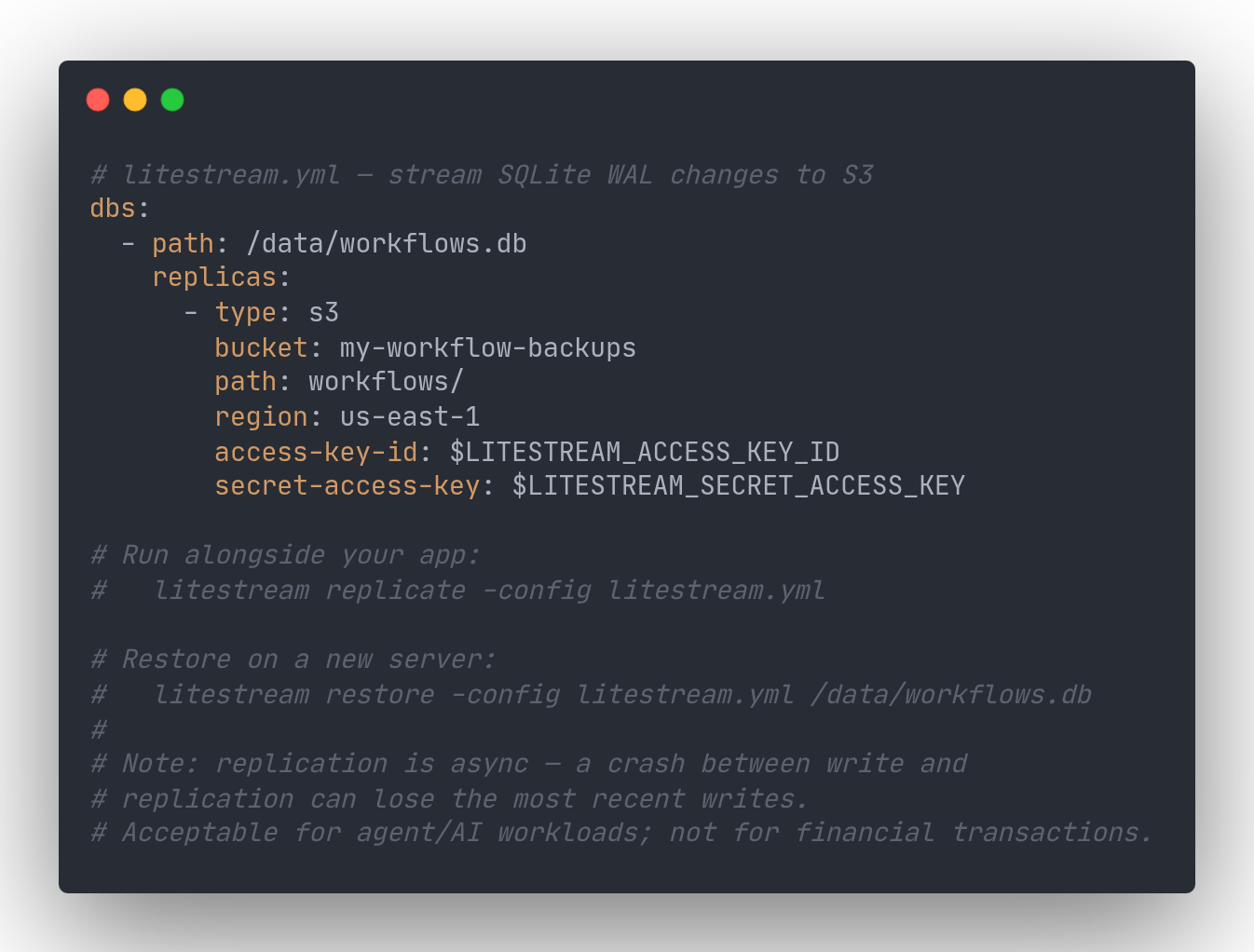
The main objection to SQLite in production is durability. Litestream solves this by streaming SQLite's write-ahead log to any S3-compatible bucket in the background. If your server disappears, you restore the database file with a single command and pick up from near where you left off.
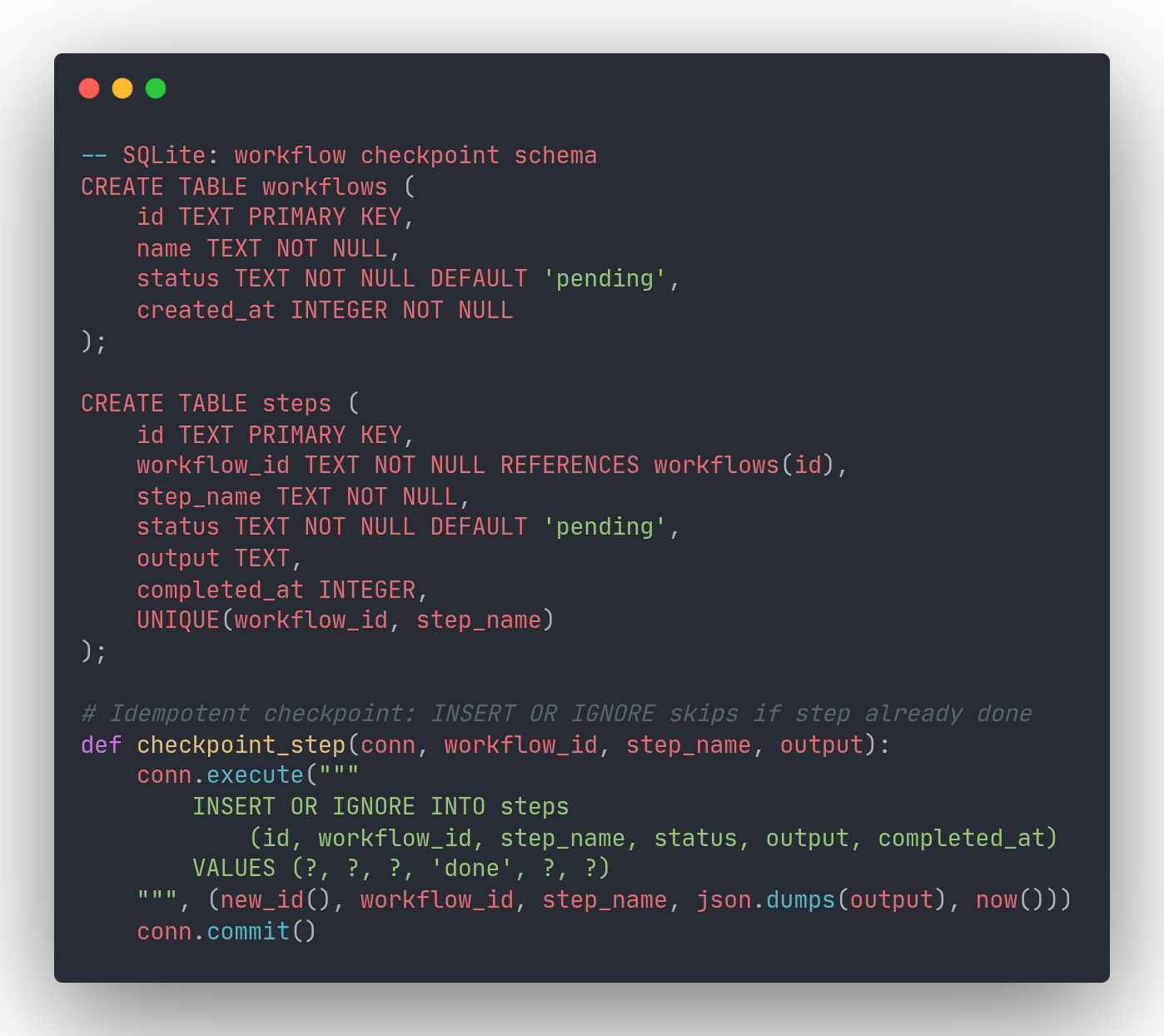
There is an important caveat: Litestream replication is asynchronous. If your server crashes between a write and its replication to S3, those writes are lost. For AI agent workflows and experimentation workloads, losing a few seconds of workflow state is usually acceptable (you retry the run). For financial transactions, that tradeoff is not acceptable. Know which category your workload falls into before committing to this approach.
When SQLite is the right choice for your workflow engine
- Single worker process. SQLite allows one writer at a time per database file, but write transactions take milliseconds and queue naturally. A single process handles thousands of concurrent users without contention.
- Per-agent or per-tenant isolation. One SQLite file per agent means no lock contention between agents and natural fault isolation between tenants.
- Bursty or experimental workloads. No server to provision or maintain. Spin up a new workflow runner alongside a fresh SQLite file, inspect state as a plain file, archive it to S3 when done.
- Simplicity is the goal. No network hop, no connection pooling, no credentials to manage. The workflow state is a file you can copy, inspect with any SQLite browser, and move between environments.
- Async backup is acceptable. Litestream typically loses at most a few seconds of writes, which is a worthwhile trade for the operational simplicity in most AI and agent pipelines.
When Postgres is the right choice
- Multiple concurrent workers.
SELECT FOR UPDATE SKIP LOCKEDis built for this. Ten workers polling the same queue will never double-dequeue a workflow. - High write throughput. DBOS reports a single Postgres server can handle tens of thousands of workflow step checkpoints per second. (This is a directional claim from their blog, not an independently verified benchmark.)
- You already run Postgres. Adding a workflows table costs nothing: no new infrastructure, no new attack surface, no new operational burden.
- Synchronous durability required. Postgres writes to its WAL synchronously. There is no async replication gap between your application and your database.
- Cross-workflow observability. SQL queries across all workflows in a single table let you filter, aggregate, and join workflow state against your application data.
- Replacing an external orchestrator. If you currently run Temporal or Airflow and want to simplify your stack, migrating to a Postgres-native workflow table is a well-understood path.
How to decide
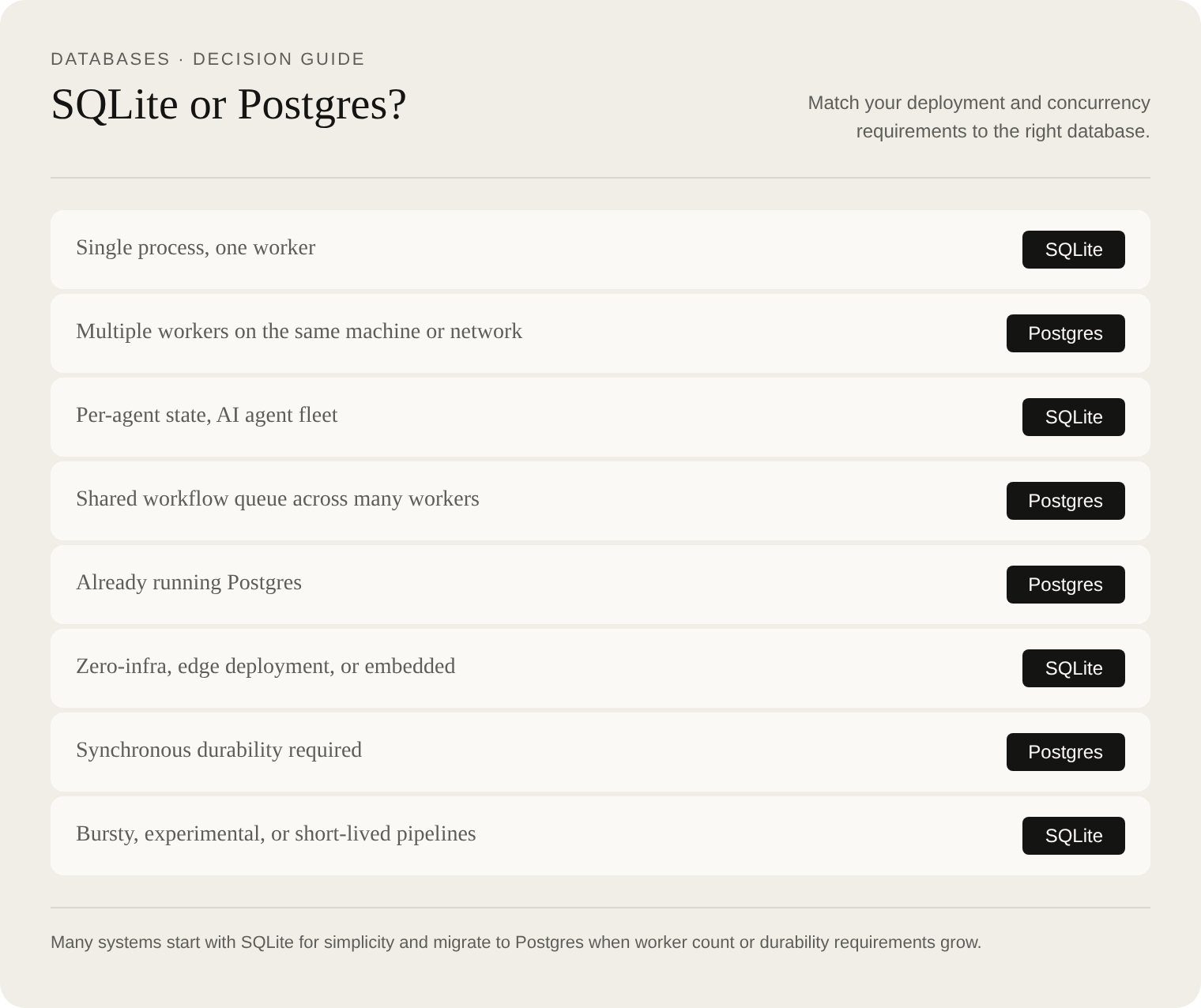
The two approaches are not mutually exclusive. Obelisk, which advocates SQLite for most cases, also ships Postgres support for deployments that need it. Start with the simpler option for your workload: SQLite if you have a single worker or want per-agent isolation, Postgres if you need distributed workers or are already invested in the Postgres ecosystem.