If you're trying to pick between Claude Code, GitHub Copilot, and Cursor in 2026, the short answer is: it depends on how you work. Each tool fits a different workflow, and plenty of developers use more than one. This guide compares all three on interface, agentic autonomy, model choice, and pricing so you can make the call for your setup.
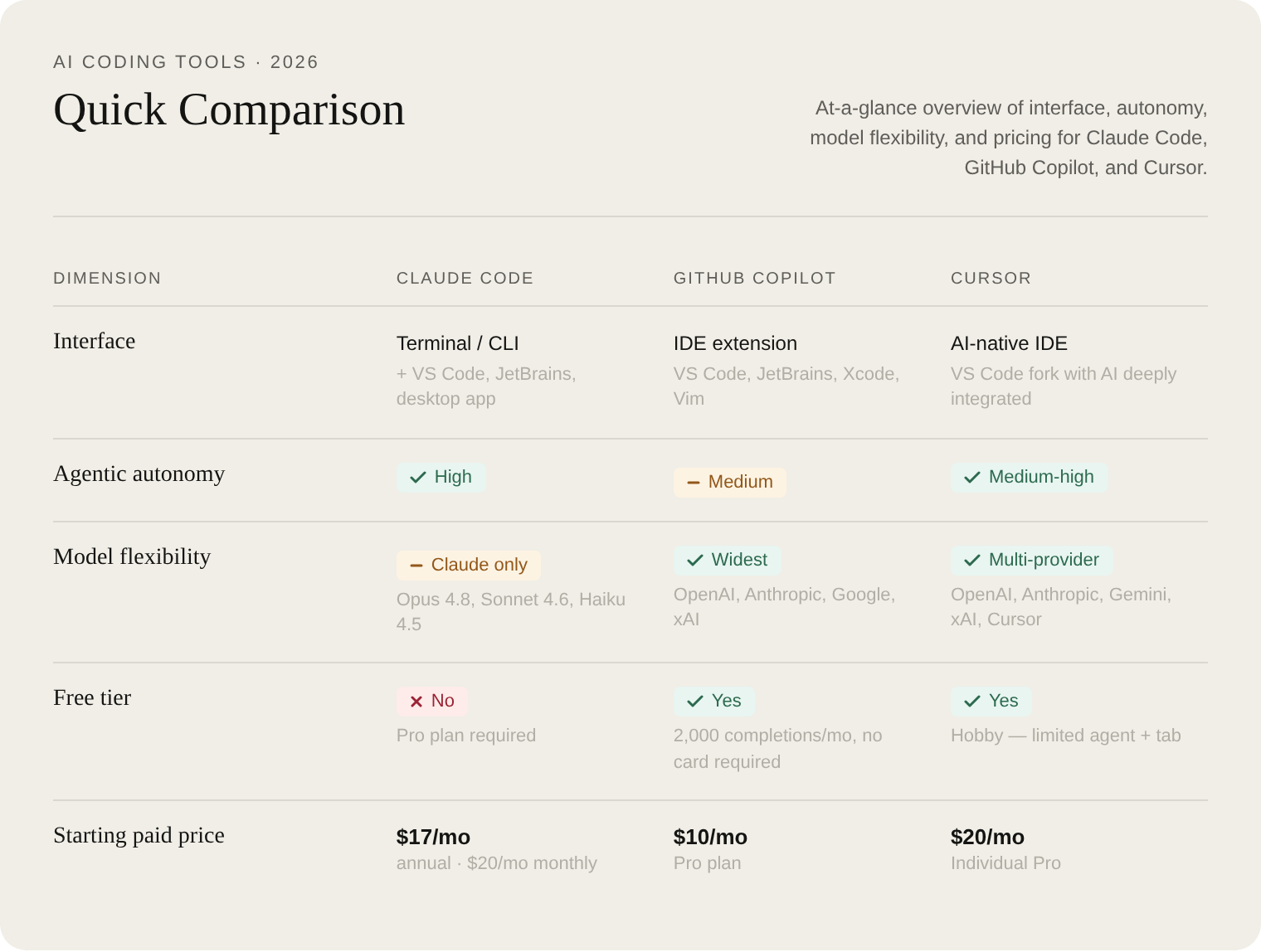
Quick Comparison
What Is Claude Code?
Claude Code is an AI-powered coding assistant that helps you build features, fix bugs, and automate development tasks. It understands your entire codebase and can work across multiple files and tools to get things done. It's terminal-native: you install it with a single command and work with it directly in your shell, IDE, or desktop app.
curl -fsSL https://claude.ai/install.sh | bash
Beyond the terminal, Claude Code runs in VS Code, JetBrains, the Claude desktop app, on the web, and in Slack. The desktop app adds visual diff review, multiple parallel sessions, and cloud session management for users who prefer a GUI.
Claude Code works with the Opus 4.8, Sonnet 4.6, and Haiku 4.5 models. Enterprise users can also run it through Amazon Bedrock or Google Cloud Vertex AI. You access it with a Claude Pro or Max plan, a Team or Enterprise premium seat, or a Claude Console account. It integrates with GitHub, GitLab, and your command-line tools to handle full workflows from the terminal: reading issues, writing code, running tests, and submitting PRs.
You add a CLAUDE.md file to your project root to set coding standards, architecture decisions, preferred libraries, and review checklists. Claude Code reads it at the start of every session.
What Is GitHub Copilot?
GitHub Copilot is an IDE extension available for VS Code, Visual Studio, JetBrains IDEs, Eclipse, Xcode, and Vim/Neovim. It provides inline autocomplete suggestions, a chat interface for coding questions, and agent mode for multi-file tasks.
Copilot's cloud agent can research a repository, create an implementation plan, and make code changes on a branch; you review the diff, iterate, and open a pull request when ready. You can also assign a GitHub issue directly to Copilot. In IDEs, agent mode lets Copilot determine which files to change, propose code edits and terminal commands for your approval, and iterate until the task is complete.
The standout feature of Copilot in 2026 is its model selector: paid plans include access to Claude Haiku 4.5 through Opus 4.8, GPT-5 through GPT-5.5, Gemini 2.5 Pro through Gemini 3.5 Flash, and xAI models, a wider range than either Claude Code or Cursor offers.
Plans run from Free through Pro ($10/mo), Pro+ ($39/mo), Max ($100/mo), Business ($19/seat/mo), and Enterprise ($39/seat/mo). Note: Starting April 20, 2026, new sign-ups for Copilot Pro, Pro+, Max, and student plans are temporarily paused. Existing plans can still be upgraded.
What Is Cursor?
Cursor is an AI-native IDE built on VS Code (Code - OSS). It ships with an Agent mode powered by Composer 2.5, a specialized Tab autocomplete model, cloud agents, and a multi-provider model selector.
In agent mode, Cursor shows a plan in the sidebar, applies changes with inline diffs, and lets you accept or reject edits per file. Cloud agents can build, test, and demo features end to end for you to review. The model picker lets you choose from OpenAI, Anthropic, Gemini, xAI, and Cursor's own models (including GPT-5.5, Opus 4.8, Gemini 3.1 Pro, and Grok 4.3). You can also install it via CLI:
curl https://cursor.com/install -fsS | bash
Cursor supports .cursorrules / Cursor Rules for project-specific instructions, MCP servers, skills, and hooks.
Plans: Hobby (free, no credit card required, limited agent + tab), Individual starting at $20/mo (Pro, Pro+, and Ultra tiers), Teams at $40/user/mo, and Enterprise at custom pricing. Individual tiers above Pro add higher agent limits; exact Pro+/Ultra prices aren't listed on the pricing page, so check cursor.com/pricing for current rates. All plans support usage-based billing: you can continue using models after your included allowance, billed in arrears.
Head-to-Head Comparison
Interface and Workflow
Claude Code is terminal-first. There's no visual diff or sidebar plan unless you use the desktop app, which adds diff review and parallel session management. For developers already living in the terminal, the onboarding is instant. For everyone else, the learning curve is steeper.
Cursor keeps the VS Code feel but layers AI deeply into the editor. Its agent mode shows the plan in a sidebar, applies changes with inline diffs, and gives you accept/reject controls per file. If you've used VS Code before, most of the muscle memory carries over.
Copilot has the lowest friction of the three. It installs as an extension in your existing editor with no IDE switch required. The tradeoff is that agentic features are buried in the UI and require more deliberate setup to use well.
Agentic Autonomy
The three tools sit at different points on the autonomy spectrum:
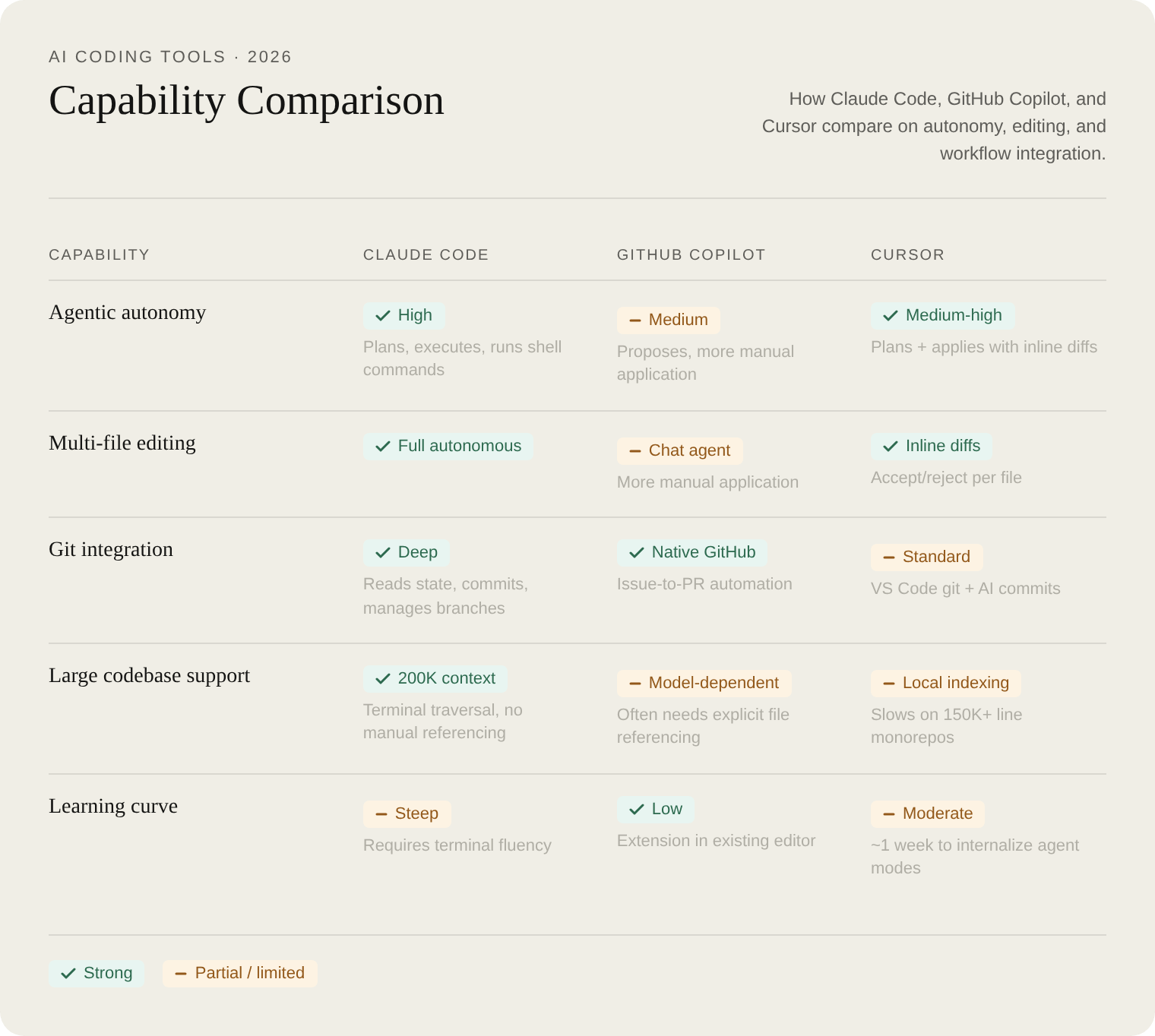
The difference shows up in real tasks. SitePoint ran all three against the same prompt: refactor a monolithic Dashboard.jsx by extracting a custom hook, splitting into subcomponents, adding PropTypes, and replacing inline styles with CSS modules.
Claude Code triggered a multi-step agentic workflow: read the existing file, generated a plan, wrote all files sequentially including the hook, three components, and CSS modules, then ran a syntax check via terminal. 8 files total, 1 manual fix needed (a missing cursor:pointer in CSS).
Cursor handled it in a single Composer interaction with Agent mode: displayed the plan in the sidebar, applied changes with inline diffs, organised output into hooks/ and components/ subdirectories. 8 files total, 1 manual fix (a missing CSS gap property, caught quickly via visual diff).
Copilot used a conversational format in Chat agent mode: 6 files created automatically, 2 CSS modules provided as inline text requiring manual creation. 2 manual fixes needed.
Model Flexibility
GitHub Copilot has the widest model selector of the three. Paid plans give access to multiple Claude, GPT, Gemini, and xAI models. Cursor supports OpenAI, Anthropic, Google, xAI, and its own Composer model, though the range is narrower than Copilot's current list. Claude Code is locked to Claude models only: Opus 4.8, Sonnet 4.6, and Haiku 4.5.
For most developers, model flexibility matters less than workflow fit. But if your team has strong opinions about which provider to use, or you want to swap models for different tasks, Copilot and Cursor give you more options.
Pricing
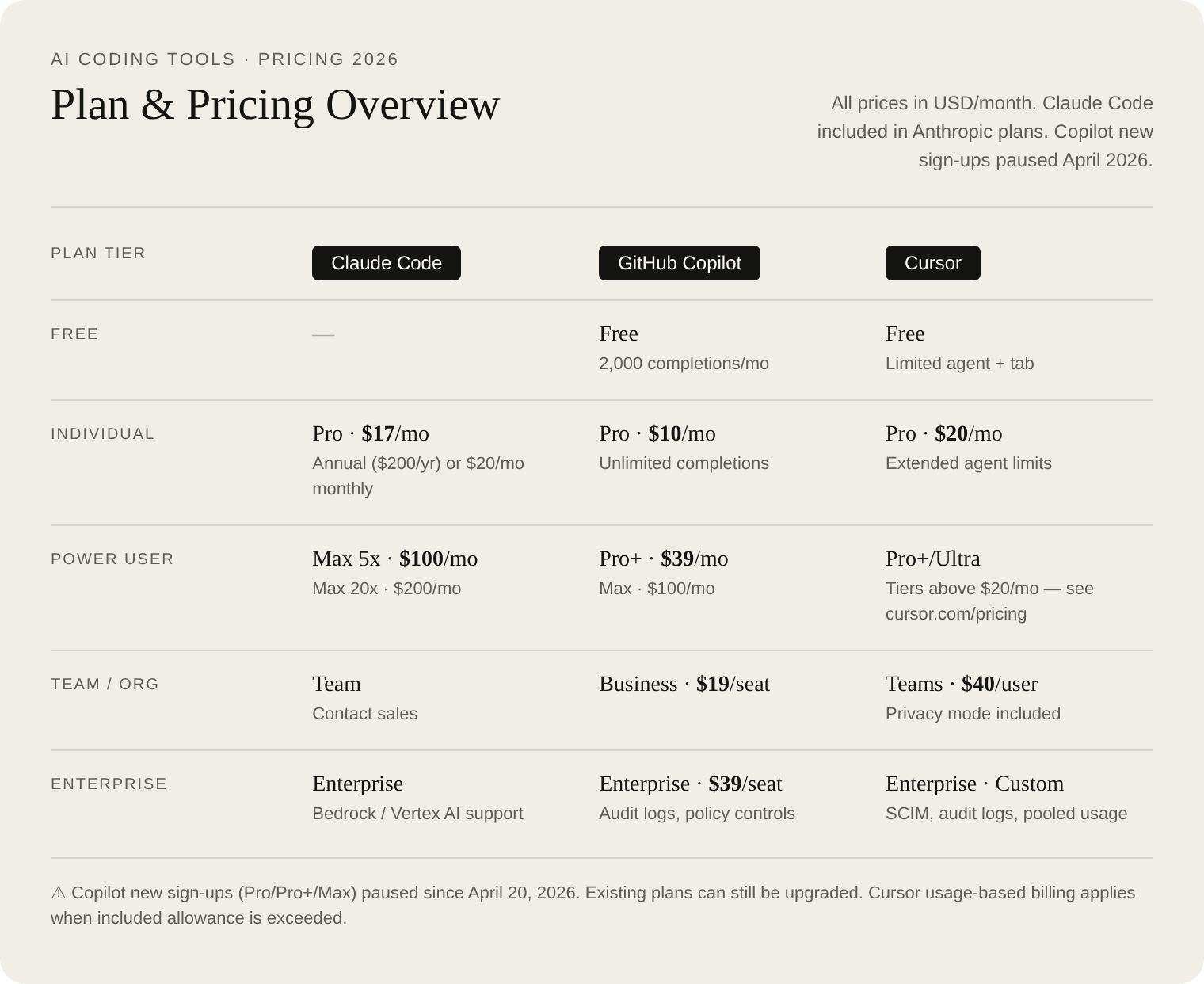
A few things to keep in mind. Claude Code is included in Anthropic's Pro/Max/Team/Enterprise plans, not sold separately. If you already pay for Claude Pro at $17/mo (annual), you get Claude Code included. The Max plans ($100/mo and $200/mo) give higher usage limits for heavier workloads.
Copilot's free tier is the most accessible starting point: 2,000 inline completions per month, no credit card required. Note the current sign-up pause: new Copilot Pro/Pro+/Max sign-ups have been paused since April 20, 2026 (existing plans can still be upgraded).
Cursor's Individual plan starts at $20/mo with Pro, Pro+, and Ultra tiers offering higher agent limits; the official pricing page doesn't list separate prices for the higher tiers. All plans include usage-based billing for when you exceed your monthly allowance.
For pricing predictability: Copilot and Cursor subscriptions are straightforward. Claude Code API usage is variable if you're on a Console account; set spending limits in the Console, or use a Max subscription for more predictability.
Learning Curve and Onboarding
Claude Code is instant for terminal users and steep for everyone else. Without the desktop app, there's no visual diff and no sidebar plan; you work in the shell. The desktop app closes that gap with visual diff review and parallel session management.
Cursor takes about a week to fully internalize the distinction between Agent mode, inline chat, and Tab autocomplete, though VS Code familiarity helps significantly. Most of the editor's existing shortcuts and extensions carry over.
Copilot has the lowest friction of the three. It installs in your existing editor and starts working immediately. The agentic features (cloud agent, agent mode in IDEs) are there, but they're not front and center; you'll need to go looking for them.
Large Codebases
Claude Code's 200K token context window plus terminal traversal gives it an edge on large projects. For monorepos over 100K lines, you can navigate and reason across the full codebase in a single session without needing to manually specify which files to include.
Cursor's local codebase indexing handles scale well for most projects, but showed slowdowns on a ~150K line monorepo in real-world testing. It learns how your codebase works and searches it semantically.
Copilot's context is model-dependent. For large codebases, it often requires explicit file referencing to keep the relevant code in context, and doesn't traverse the codebase autonomously the way Claude Code does.
Which Should You Choose?

Verdict
There's no single winner in the Claude Code vs GitHub Copilot vs Cursor comparison in 2026. Many developers use more than one: Claude Code for deep refactors and complex multi-file tasks, Copilot for daily inline completions in an existing editor, and Cursor when they want a unified AI-native IDE. The choice comes down to where you work (terminal, extension, or dedicated IDE) and how much autonomy you want the agent to have.